A customer portal or member area gives people one place to manage the parts of their relationship that are specific to them.
That might include bookings, payments, documents, purchases, messages, membership information or previous activity. Behind it, staff can manage users, review requests, update information and control who has access to what.
Some portals only need a handful of functions. Others connect the public website, memberships, bookings, shops, staff tools and internal administration.
The right version depends on what customers, members and staff genuinely need to do. A business should not have to reorganise its workflow around a fixed portal package.
For a wider explanation of where portals fit, read what a web app is and how it differs from a website.
What can customers or members manage themselves?
A portal can give each person access to information and actions connected to their account.
Depending on the organisation, that could include:
- Updating contact details
- Checking membership or subscription status
- Making and managing bookings
- Viewing payments, invoices or balances
- Accessing documents and downloads
- Reviewing orders or purchase history
- Reading messages and notices
- Checking results, progress or previous activity
This can remove a lot of avoidable administration.
A member should not need to email the organisation to find a document that could already sit in their account. A customer should not need to call to check whether a payment or booking has been confirmed. Someone renewing a membership should not have to provide information the business already holds.
The portal can still reflect the organisation’s rules. Some changes may need approval. Certain information may be visible but not editable. Different membership or customer types may have access to different services, prices or content.
That flexibility is important because most organisations do not have one identical relationship with every user.
The same account can also hold useful history. Previous bookings, purchases, reports, coaching notes, scores or submitted requests remain connected to the person rather than being scattered across emails and spreadsheets.
That history should help them do something useful, whether that is repeating a booking, finding a document, reviewing their progress or understanding what happens next.
One platform can support customers, members and staff differently
The person logging in only needs to see the tools and information relevant to them.
A customer might see bookings, payments and account details. A member may also have access to private content, events or benefits. Staff might manage availability, review requests or update records. Administrators may need wider control over users, permissions and reporting.
All of those experiences can sit within the same wider platform without giving everyone access to the same things.
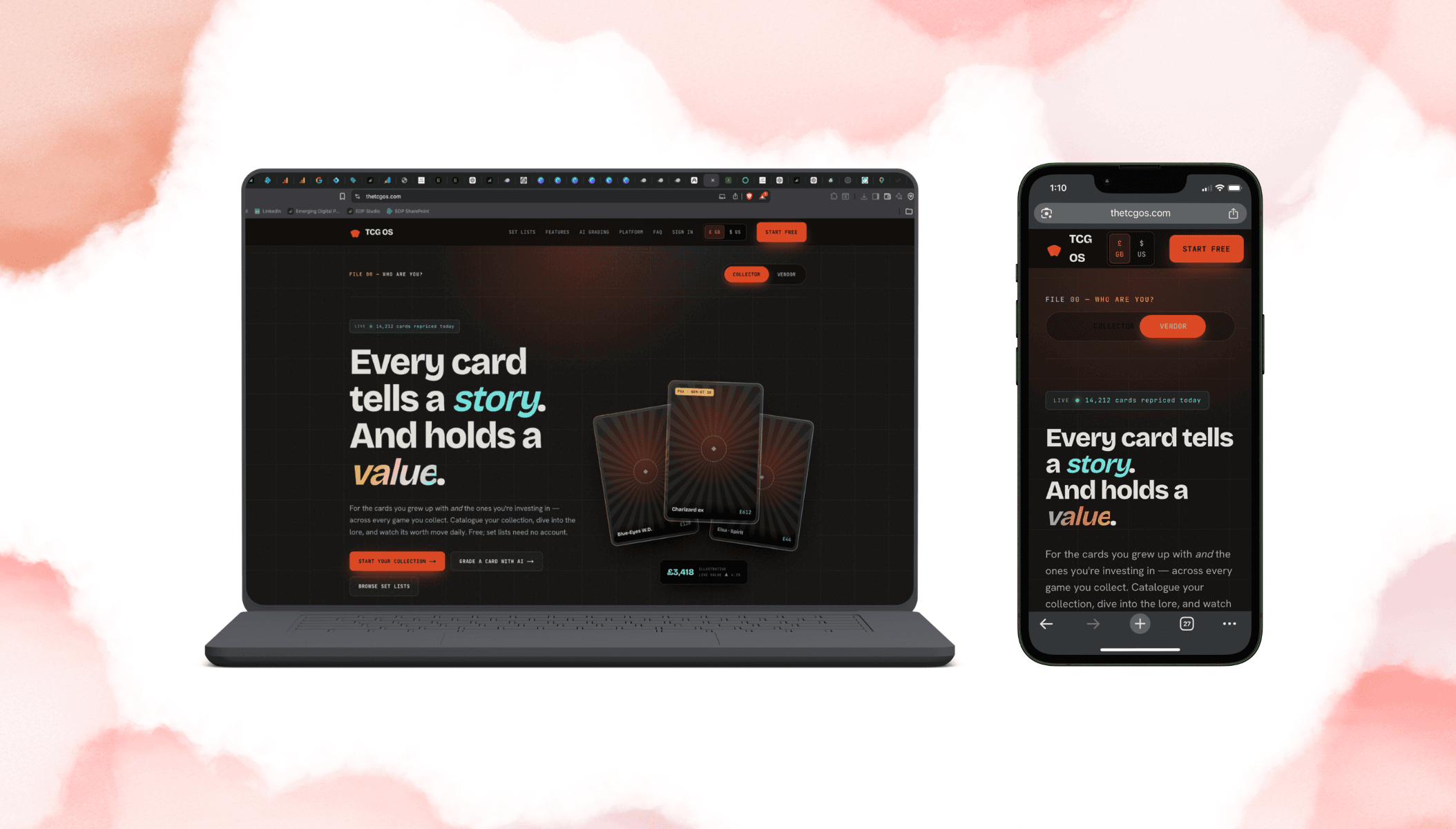
The TCG OS is a good example. Collectors use the platform to manage cards and track their collections, while vendors need inventory, listing and sales tools. They are using the same product, but the functionality reflects what each group is there to do.
The staff-facing side needs the same level of thought.
Someone managing bookings should not have to work through an oversized control panel containing every feature in the system. A content editor may only need access to notices and resources. A business owner may need a wider view of activity and reporting.
When the back end is difficult to use, staff often return to the spreadsheets and manual workarounds the portal was meant to replace.
The logged-in area should also feel connected to the public website.
A person may discover the organisation through a service or membership page, then move into a private account to manage the ongoing relationship. That transition should not feel like they have been sent to an unrelated third-party platform.
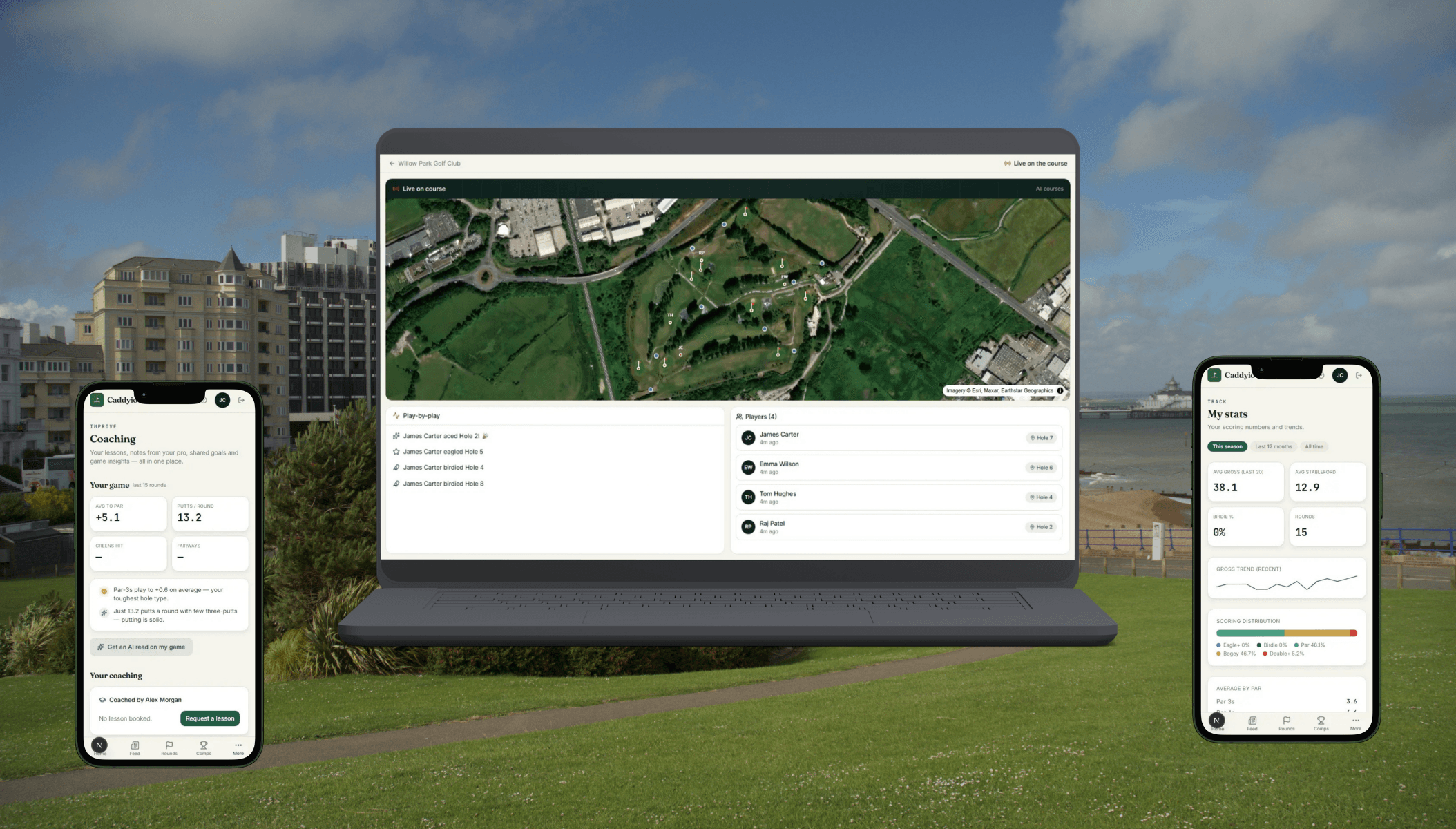
With Horam Park Golf Club, the public website explains the course, facilities, coaching and memberships. The member area and administrative tools then continue that relationship after someone logs in.
The public and private sides have different jobs, but they should still feel like parts of the same organisation.
How can a portal connect with bookings, payments and existing systems?
A portal does not need to replace every piece of software the business already uses.
The organisation may already have a payment provider, CRM, calendar, booking tool or specialist industry platform that works well. Those systems can continue doing their job while the portal creates a clearer experience around them.
For example, a customer could manage a booking through their account while the details continue into the calendar staff already use. A payment can update the customer’s status automatically. Information from several systems can appear in one staff dashboard without being entered again.
Other tools may be causing the problem and need to be replaced.
The decision comes down to what works, where information is being duplicated and which parts of the process need to feel more joined up.
This can also support more specific business models.
A retailer may need a public shop for normal customers and a private trade area with different products, pricing or order options. A membership organisation may need public information for prospective members and a private area for bookings, documents and communication. A venue may need bookings to connect with check-ins, live activities and staff administration.
A basic booking link may complete the initial transaction without supporting anything that happens around it. A connected portal can carry the relationship further.
When does a custom portal make sense?
An off-the-shelf customer or membership platform can be the right choice when the requirement is standard and the organisation is comfortable working within its structure.
Custom development becomes more relevant when:
- The portal needs to follow a specific workflow
- Several user types need different access
- The public website and private account need to work closely together
- Existing platforms need to exchange information
- Staff need administration tools shaped around their role
- Standard software is missing an important function
- The portal is becoming a central part of the service
A custom portal does not need to include every possible feature from the first day.
The first version could focus on account access and bookings. It might begin with a member area and staff administration. It could solve one difficult workflow before expanding into a wider platform.
That allows the system to develop around real use rather than filling it with features nobody needs.
At EDP, we start by mapping what each person needs to be able to do.
We look at what should remain public, what belongs behind a login, what staff need to manage and which existing systems should stay connected. From there, we can plan the website, portal, administration tools and integrations as one project.
The result could be a focused client portal, a branded member area or a wider platform involving shops, bookings, dashboards and several user roles.
The size and functionality should fit the organisation rather than forcing the organisation into a fixed package.
Planning a customer portal or member area?
Tell us what your customers, members and staff currently need to do, including the parts that still rely on emails, spreadsheets or disconnected platforms.
We can help map the public website, logged-in experience, administration tools and integrations so they work as one connected system.
Frequently asked questions
A customer portal is a private online area where customers can access information, manage their account and complete actions connected to their relationship with a business.
Want a hand with this?
We help businesses across Eastbourne and East Sussex turn this kind of thinking into real results.
Start a conversation